Select your location
You are on the global SCHILLER Headquarters Website. Would you like to see the content for another country or in another language?

SCHILLER Academy for end users
E-learning platform for medical and healthcare professionals
- Up to date, engaging content direct from the manufacturer:
tailored to medical and healthcare professionals - No staff downtime:
training for individual device users, regardless of time or location - Confirmation of compliance:
certificate issued at the end of a course
The SCHILLER Academy e-learning platform is a course platform for end users of SCHILLER-Group devices. As a user of SCHILLER-Group devices, you can use this platform to purchase e-learning courses for yourself and your staff to learn more about how to use the devices.
The training content comes directly from SCHILLER, the device manufacturer. Profit from accuracy and relevance. Train according to your individual need, place and speed. No need to block entire staff for training or worry about staff turnover.


Frequently Asked Questions (FAQs):
-
What content is covered in the e-learning courses?
The product training courses are interactive SCORM files that include the following:
- a 'device introduction' providing an overview of all the product's features,
- a 'how to use' section explaining how to use the features in detail, step by step, containing simulations that allow partial virtual operation of the device,
- a 'Frequently Asked Questions' section; and
- a knowledge test on the course content.
Upon successfully completing the knowledge test, a personalised digital certificate of completion can be downloaded
-
Are the courses only available in English?
The courses are initially available in English. They will also be offered in other languages, such as German, French, Spanish, and Italian. Decisions regarding additional languages will be made on a case-by-case basis.
-
Can I purchase e-learning courses for my whole team?
Yes, it is possible to make a ‘group purchase’. When ‘group purchase’ is selected, a person responsible at the customer's company (e.g. the person responsible for training or purchasing) can purchase courses for that customer's staff. During the checkout, the purchaser must input the group size (number of users) as well as the names and email addresses of all users. After the transaction is complete, these users will receive an automatic email containing instructions and a link where they can set their personal password and complete their user profile.
The ‘group purchase’ checkbox is located above the course catalogue, to the left of the language filter. It must be checked before proceeding to checkout.
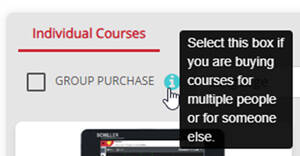
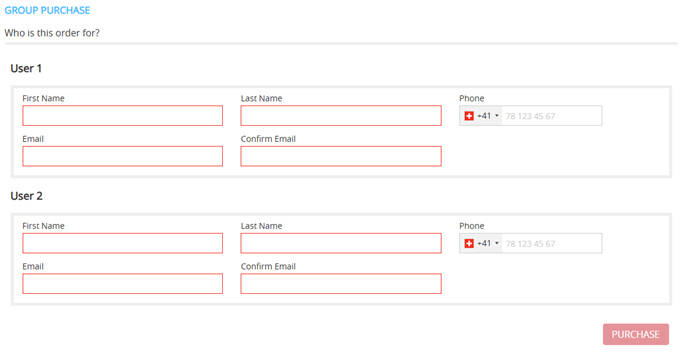
Note that if you want to purchase several courses for a group, the group size and the input users apply to all courses in the cart. To purchase different courses for different groups, separate group purchases must be made for each course.
-
When do I need to make a ‘group purchase’, when an individual purchase?
‘Group purchase’ needs to be ticked if you are purchasing for a single user other than you, or if you are purchasing for more than one user.
If you are purchasing for yourself as the only user, then the ‘group purchase’ checkbox must not be ticked. -
Can a SCHILLER distributor purchase courses on the platform for its end customers?
Yes, it is possible for SCHILLER distributors to purchase courses for their end customers. To do so, the distributor must create an account, complete a group purchase, and enter the data of the end customer's users for whom the course is being purchased. In this case, the distributor pays for the courses on the platform. Any further invoicing between the distributor and the end customer is carried out individually and separately from the platform by the distributor.
End customer users are automatically notified when an account has been created for them and courses have been assigned.
-
I want to purchase several courses in a ‘group purchase’, but with different users for different courses. Is this possible?
No, not in one single purchase. If you want to purchase several courses for a group, the group size and the input users apply to all courses in the cart. Therefore, to purchase different courses for different users, several group purchases per course must be made.
-
What is an access code, and how do I receive one?
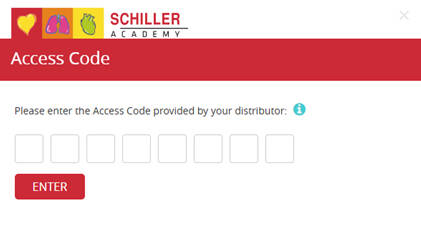
To create an account on SCHILLER Academy for end users, the customer must input an access code for authentication. This access code is distributed to the end customers via the responsible SCHILLER subsidiary or the local SCHILLER distributor. If you want to create an account and you do not have an access code, please contact your local SCHILLER distributor.
The access code is only required for account creation. No access code is required for subsequent logins.Note that the access codes expire after a certain duration.
-
Do I need the access code every time I log in?
No, the access code is only required for account creation. For subsequent logins, no access code is required.
-
How is VAT or sales tax handled when purchasing courses?
All purchases made by end customers at SCHILLER Academy are considered B2B (business-to-business). Only businesses and companies are permitted to purchase courses. For non-domestic businesses (outside Switzerland), the ‘reverse charge’ mechanism applies. Depending on the purchaser's local legislation, the customer may be required to account for VAT or similar taxes under the reverse charge mechanism. For purchases from Switzerland, VAT is included in the purchase price.
-
What payment methods are available?
SCHILLER Academy uses the ‘PayPal’ payment gateway. Users can purchase courses by submitting their credit card information or by logging in with an existing PayPal account. When using a credit card as payment method, no PayPal account is required.
-
For how long do I have access to a course?
Access to a purchased course is limited in time. Typically, the course access expires 3 months after the purchase. Course availability for a user is stated in the course catalogue. After the purchase, the expiry date is shown in the user dashboard.
-
How often can I repeat the same course within the access period?
The course can be accessed again and can be repeated as many times as wanted within the access period, which is typically 3 months.
-
Can I access a course again after it has expired?
No, the course is no longer accessible after it has expired. To access an expired course, it must be purchased again.
The user's course history is still visible on the dashboard and certificates for completed courses can still be downloaded.
-
Can the courses be downloaded?
No, the courses can only be conducted online on the SCHILLER Academy platform and cannot be downloaded.
-
Can we share an account and therefore the course access with the whole team?
No, the user accounts are personal. A certificate of completion is issued to the subscribed user upon successful completion of a course.


